Sterling’s Retro PC Portal Sterling’s Retro PC Portal |
|||||
| Homepage | Presario 4112 |
Win98 | WinXP | Sterlnet ISP |
Main Site not HTML 3.2! |
Sterlnet
Sterlnet is a PPP-over-TCP Internet gateway.
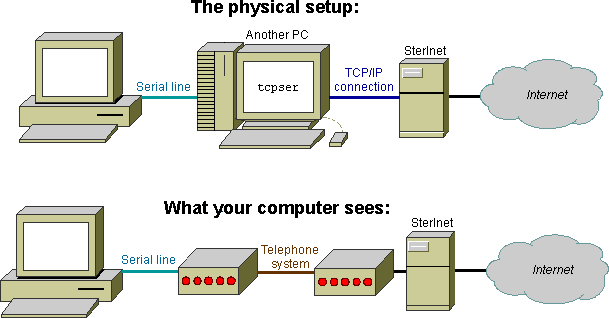
The most likely use for Sterlnet is for a vintage computer—real or emulated—for which Ethernet and/or phone line access is impractical or unattainable. In this case, the computer in question can be connected via serial line to a separate, Internet-connected PC which, using specialized software, pretends to be an era-appropriate dial-up modem. However, hosts to which a user can connect this way in the 2020s are almost exclusively BBSes, not gateways to the Internet as a whole. Sterlnet looks and acts the exact same as a 1990s dial-up ISP from your computer’s point-of-view, allowing full, native Internet access.
Looking for dial-up Internet access over an actual phone line? Try dialup.world. If you really want to connect to Sterlnet, though, check out the voiceband modem section.
Getting started
Sterlnet currently supports access via PPP, the Point-to-Point Protocol. SLIP (Serial Line Internet Protocol) is not yet supported. Consult your operating system’s documentation to determine whether you can connect and/or if you need additional software.
Gaining access
In order to actually make use of Sterlnet, you’ll need a login and password. You can receive one by filling out the access request form. The vetting and approval process is entirely manual, so allow up to a week for processing and back-and-forth communication.
Preparing a modem emulator
When you dial into another computer over the phone network—whether it be a bulletin board system (BBS) or an Internet service provider (ISP)—you’re not making a truly direct connection. Even though the 1s and 0s seem to be received exactly as they were sent, they don’t stay exactly like that the whole way. In between the computers are modems, which translate “computer speak” to and from “phone line speak”, since the two are incompatible.
A modem emulator takes the place of your modem, and, instead of connecting to another modem over phone lines, the emulator connects to a socket over the Internet. From your computer’s point of view, however, the modem acts like a real Hayes Smartmodem connected to the phone line. The author recommends RETRO Innovation’s fork of tcpser, as it’s currently maintained and natively cross-platform. Installation instructions are available on the repository.
Connecting an actual computer
Simply run your modem emulator on your modern, Internet-connected computer, then connect your vintage computer to your modern computer via null-modem serial cable. The specifics of establishing a dial-up connection on your vintage computer are left for you to figure out.
If you’re using the recommended tcpser, the following is an example command which emulates a 38400 bps modem on /dev/ttyS0 (COM1), and which will connect to Sterlnet when number 5551234 is dialed:
tcpser -d /dev/ttyS0 -s 38400 -n 5551234=brewster.ssterling.net:1023Connecting a virtual machine
If you’re running Linux, check out the tty0tty kernel module. This module creates devices which emulate null modems. By connecting a guest serial port to, e.g. /dev/tnt6, you can run tcpser to listen on /dev/tnt7. If you’re running GNU/Linux, I doubt you need a tutorial; tty0tty’s docs (and those of whatever VM manager you use, if any) should suffice.
Client-side configuration
Authentication methods supported are CHAP (the Challenge-Handshake Authentication Protocol), MS-CHAP (Microsoft’s proprietary CHAP variant) and PAP (the Password Authentication Protocol). Despite the security implied by the word “authentication”, bear in mind that everything sent over PPP is unencrypted and in the clear, unless encrypted by an upper-layer protocol (e.g. HTTPS).
The server will assign you an IPv4 address within the 10.14.4.0/22 block automatically through IPCP (the Internet Protocol Control Protocol). Static configuration and other protocols are not yet supported.
Services
Various services are available to Sterlnet users to enable easier connection to the Internet.
WebOne proxy
Sterlnet runs a WebOne proxy on proxy.vin.int.ssterling.net. WebOne does a variety of things useful for retrocomputing, including:
- Allowing browsers which only support HTTP to connect to servers which require HTTPS
- Re-enabling Windows Update through Windows Update Restored (95, 98, Me and NT 4.0) and Legacy Update (2000, XP, etc.)
- Transparently accessing the Internet Archive’s Wayback Machine for services such as Active Channels and Windows Media pages
You can automatically configure the proxy on some systems with the PAC file http://proxy.vin.int.ssterling.net/auto.pac. Bear in mind that you can’t access this proxy from outside SterlNet.
Unencrypted e-Mail
You can read and send e-Mail using unencrypted IMAP, POP3 and SMTP. Your e-Mail address is simply [your Sterlnet login]@retro.ssterling.net.
| Address | Port | Security | Authentication | |
|---|---|---|---|---|
| SMTP | mail.vin.int.ssterling.net | 25 | none | none |
| IMAP | mail.vin.int.ssterling.net | 143 | none | plain |
| POP3 | mail.vin.int.ssterling.net | 110 | none | plain |
Username must include domain, e.g. user@example.com, not just user. SMTP requires authentication in the same way.
Also, note that accessing POP3 doesn’t actually delete your e-Mail messages; it simply keeps them from appearing next time you use POP3. To truly delete them, use IMAP.
Voiceband modem access
Modems are infamously unreliable over VoIP. If you still wish to try to connect to Sterlnet via voiceband to a softmodem, you’ve got a few options.
PSTN
You can dial +1 (304) 566-1337 from within the United States to reach a secondary dialtone, after which you can select a modem by dialing an extension from one through five:
- Bell 103, 300 bps, 8N1
- V.21, 300 bps, 8N1
- V.22, 1200/600 bps, 8N1
- V.22bis, 2400/1200 bps, 8N1
- V.23, 1200/600 bps / 75 bps, 8N1
Calls through the PSTN are limited to one hour in length, and the idle timeout is five minutes. If you end up using this frequently, consider donating, since I pay by the minute for incoming calls.
SterTel
The following numbers are available via SterTel on various hobbyist vintage telephony networks:
- PhreakNet FU7-1000: V.22bis, 2400/1200 bps, 8N1
- PhreakNet FU7-1001: Bell 103, 300 bps, 8N1
- C*NET OR7-2100: V.22bis, 2400/1200 bps, 8N1
- C*NET OR7-2101: Bell 103, 300 bps, 8N1